- Help Center
- Printer Bridge
- Learning Center | Support
-
Printer Bridge
- Launching Your Site | Company Variable & Email Set Up
- Learning Center | Support
- Launching Site | Payment Set Up
- Launching Site | Storefront Customization Setup
- Launching Site | Pricing & Product Setup
- Launching Site | Shipping Setup
- Launching Site | Placing a Test Order
- Launching Site | Marketing & SEO
- Learning Center | Admin/Store Set Up
- Learning Center | Order Related
- Learning Center | Product Related
- Learning Center | Contact Blaster
- Learning Center | Corporate Portal
- Learning Center | Online Designer
- Learning Center | User Roles / ACL
- General FAQ
- FAQ | Storefront Customization & CMS
- FAQ | Site Features / Functionality
- FAQ | Order Related
- FAQ | HTML/CSS
- FAQ | Corporate Portal
- FAQ | Staff Management
- FAQ | Admin Reports
- FAQ | Shipping Related
- FAQ | Questions from our Canadian Customers
- FAQ | Sign-Up Questions
- eCommerce Myths
- Marketing Your Site | Marketing, Analytics and Stats
- Marketing Your Site | Meta Data
- Marketing Your Site | SEO Strategy
- Marketing Your Site | Email Campaigns
- Marketing Your Site | Social Media
Can I Disable Sample Packs on my Store?
This article will show you were you can disable or enable sample packs on your store.
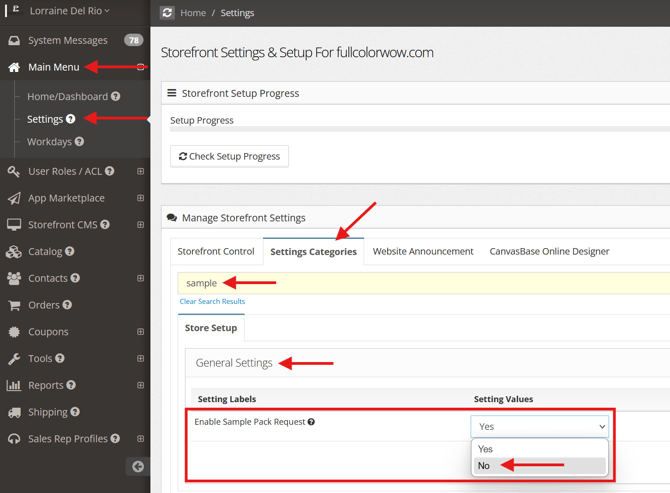
Yes, you can disable the Sample Pack option on your store. The setting option is in the General Settings.
Go to:
Main Menu>Settings
Settings Categories> Type in a Key Word Search "Sample"
General Settings> Enable Sample Pack Request> NO