
Please note that the HTML and CSS that you see in this section may not affect your storefront. This should be seen as a general template to assist you with customization. It would depend on the changes that already been made within the admin panel.
.navbar-default .navbar-nav > li > a:hover, .navbar-default .navbar-nav > li > a:focus {
    color: #c00 !important;
}
*Try this. You can replace the c00 with whatever hex number that you want.*
Here's how to apply the code:
- Login to your admin
- Go to Storefront CMS
- CMS Features
- Theme Settings
- Custom CSS tab
- Copy the code in blue above and paste it at the top or bottom of the "Global Custom CSS Code" box.
- Save/Update Layout
- Go to your storefront, refresh, and the 3 default images will be removed
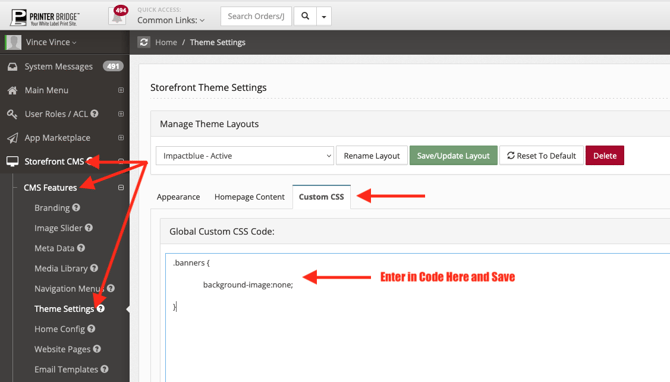
*please note that the code in the screen shot is to show location only. You will need to use the code that is provided in this resource.