.category-group-item .group-title {
font-weight: 900;
text-align: left;
text-transform: uppercase;
vertical-align: top;
margin-bottom: 0;
color: #333399;
}

.nav-expanded .category-group-item {
float: left;
clear: none;
margin-right: 1%;
width: 15.6%;
padding-left: 1%;
font-size: 12px;
}
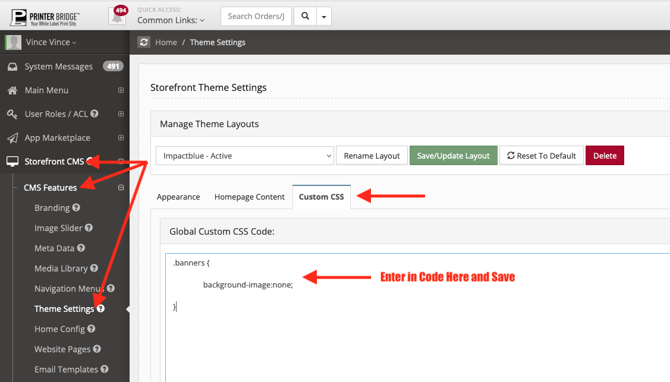
Here's how to apply the code:
- Login to your admin
- Go to Storefront CMS
- CMS Features
- Theme Settings
- Custom CSS tab
- Copy the code in blue above and paste it at the top or bottom of the "Global Custom CSS Code" box.
- Save/Update Layout
- Go to your storefront, refresh, and the 3 default images will be removed