
-
Here’s a clear FAQ based on the video content explaining the Integration Settings section.
FAQ: Integration Settings
1. Where do I find the Integration Settings?
To access the integration settings:
-
Go to the left navigation menu.
-
Click Main Menu > Settings > Integration Settings.
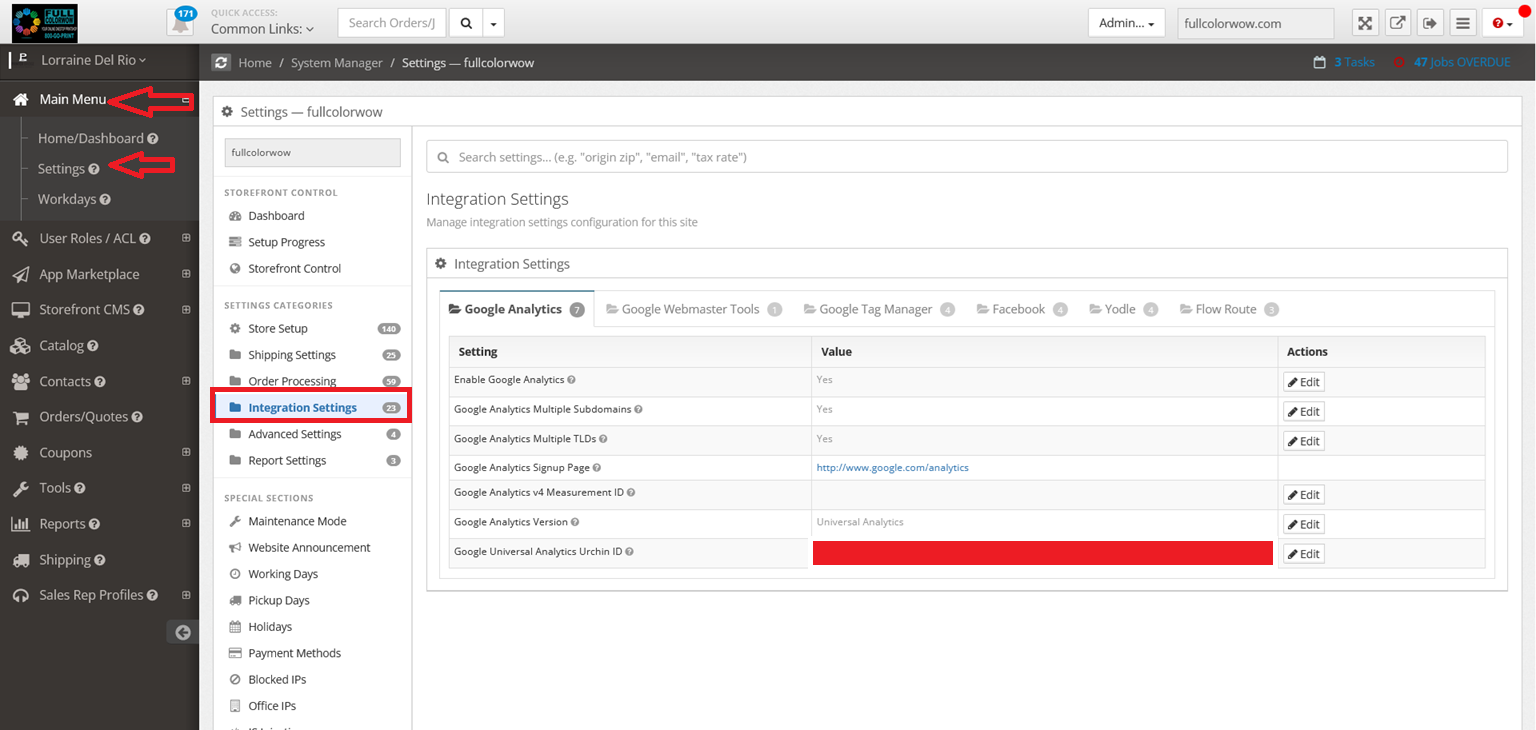
This section allows you to connect your website with various third-party services.
2. What is the purpose of the Google Analytics integration?
The Google Analytics integration lets you track website traffic, user behavior, and performance metrics.
You can:
-
Enable or disable analytics tracking
-
Track multiple subdomains as a single entity
-
Track multiple top-level domains (such as
.com,.net,.org)
To use it, enter your Google Analytics ID.
3. What does the “Track Multiple Subdomains” option do?
If enabled, this option tracks multiple subdomains under one domain as a single entity.
Example:
-
www.example.com -
blog.example.com -
shop.example.com
All traffic will be tracked together in your analytics data.
4. What does “Track Multiple Top-Level Domains” mean?
This option allows you to track several domains together in the same analytics account.
Example:
-
example.com -
example.net -
example.org
This is useful if you manage multiple related websites.
5. What should I do if I don’t have a Google Analytics account?
You can sign up directly through the provided link in the settings to create an account with Google and then paste your Analytics ID into the field.
6. What are Webmaster Tools settings used for?
The Webmaster Tools section connects your site to search monitoring tools so you can manage indexing and site visibility.
You will need:
-
Name Key
-
Store Key
These help verify ownership and connect your site to search tools.
7. Why do I need a Google Maps API key?
The Google Maps integration allows maps to appear on your website.
You’ll need to enter:
-
Google Maps API Key
-
Latitude center
-
Longitude center
This determines where the map is centered on your website.
8. What is the Google Custom Search integration?
The Google Custom Search feature allows you to place a Google-powered search bar on your website.
You can:
-
Enable or disable the feature
-
Enter your Search Engine ID
9. What is the Facebook Affiliate Share feature?
The Facebook Affiliate Share feature lets customers share their purchase on Facebook after completing checkout.
This can help:
-
Promote your store
-
Increase social visibility
-
Encourage referrals.
10. How does Facebook Login work?
Facebook Login allows users to quickly create an account or log in using their Facebook credentials.
To enable it, you must enter:
-
Facebook App ID
-
Facebook App Secret
Both are required for the feature to work.
11. What is the Yodel integration?
The Yodel integration allows you to connect review and marketing widgets.
You will need to add:
-
Yodel ID
-
Widget ID
-
Offer ID
-
Photo ID
-
Review ID
12. What is Flowroute used for?
The Flowroute integration connects your site to Flowroute’s communication services.
You must enter:
-
Access Key
-
Secret Key
If you don’t have an account, you can sign up using the link provided in the settings.
13. How can I get more details about each setting?
Each setting includes a question mark icon (?). Hover your mouse over it to see a detailed explanation of that option.
-